


nugs
4.72.00K Reviews
App Specs
- Version
- Varies with Device
- Updated On
- License
- Free
- Downloads
- 500,000+
- Developer
- nugs.net
- Categories
- Music & Audio
- Platform
- Android
Screenshots
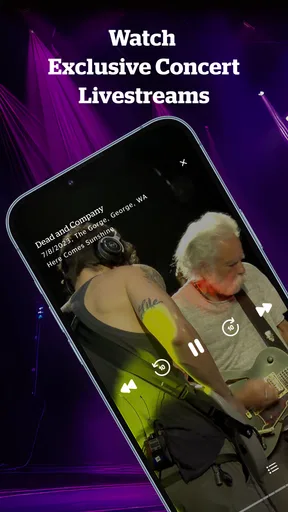
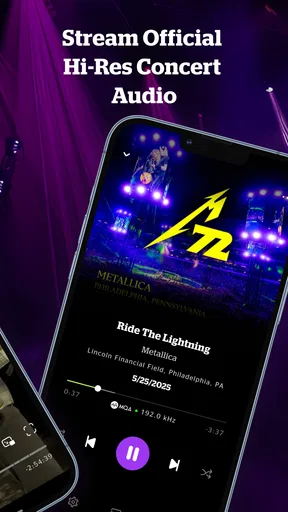
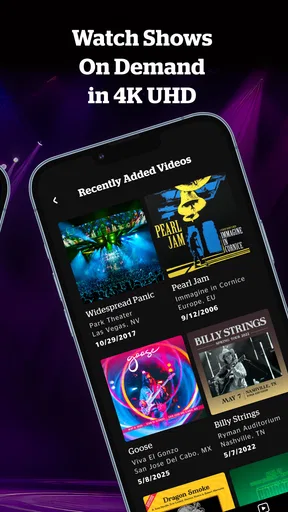
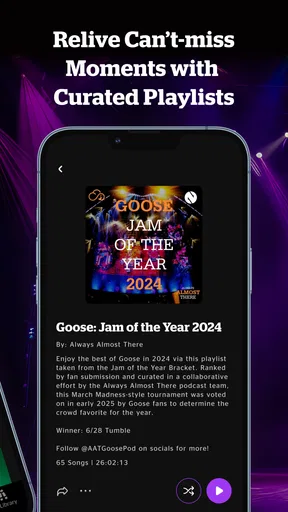
 Analysis by AppCompare
I judge a live-music app by what happens when I’m away from reliable Wi-Fi as much as by what it plays at home. A concert stream can feel immediate and vivid when the connection holds, but a long set is also a tougher test than a short song: pauses, loading, and changes in signal are more noticeable. That makes nugs most interesting to me when I want to spend time with a performance, rather than simply fill the background with familiar tracks.
For a planned listening session, I’d start while connected to a stable network, browse for a particular artist or show, and give the performance a moment to begin before settling in. That small habit helps distinguish a slow start from a genuine connection problem. I also wouldn’t assume every stream will behave the same way: a live recording can be a longer, less predictable listen than a playlist of individual tracks, and network conditions can change between home, work, and the road.
When a live stream depends on your connection
The app’s focus is a real strength when I’m in the mood to hear a set unfold as a whole. A studio playlist is built for quick skips and easy background listening; a concert asks for more attention. With a dependable connection, that can make an ordinary evening feel more like choosing a seat for a show. When the signal is weak, though, the same long-form listening can become frustrating because a pause interrupts the momentum of the performance.
I’d use that difference to decide what to play. If I have only a few minutes or I’m moving between areas with uncertain reception, I’m more likely to choose something short or wait until I’m settled. If I want to explore a full performance, I’d begin somewhere with a stronger connection rather than start in the middle of a commute and hope for the best. That is not a criticism unique to this app; it is simply a practical trade-off of streaming concert-length audio.
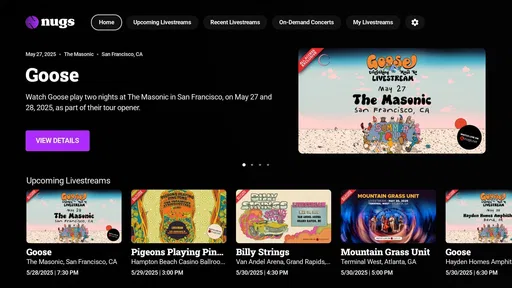
For big events, it’s also worth separating the excitement of a livestream from the convenience of an on-demand listen. A live broadcast has a particular appeal because it feels shared and timely, but it is a poor fit if my schedule or signal is unpredictable. When I can’t give it a reliable window, I prefer to explore recordings at a time that suits me instead of treating a scheduled stream as something I must catch at all costs.
Choosing the right mobile moment
On a phone, nugs makes the most sense when I know what kind of listening I want before I open it. A quick browse can turn into a longer session because a show invites me to stay with it, so I’d pick an artist or a musical mood first if I’m heading out the door. That’s a useful distinction from a general-purpose music service, where I might open an automatically assembled mix and let it run without much thought.
A realistic routine would be to browse at home, find a performance for the evening, and then listen while cooking or relaxing. In that setting, I can pay attention to the set without checking my signal every few minutes. If I’m walking through places where reception changes, I’d keep expectations modest and avoid making an important livestream the soundtrack to a trip that cannot pause. That makes the app a better companion for settled listening than for every moment of a busy day.
Worth Reading Before You Choose

Flipboard Shows What News Apps Must Do Beyond the Feed

Switching to Android Auto Means Rethinking Your Driving Routine

Google Calendar Makes a Crowded Week Easier to Manage

Ludo King Makes the Most of the Minutes Between Plans

Baby Panda World Brings Quick Play to Modern Phones, but Its Game Library Feels Busy

ESPN’s Live Game View Makes Following Close Games Easier
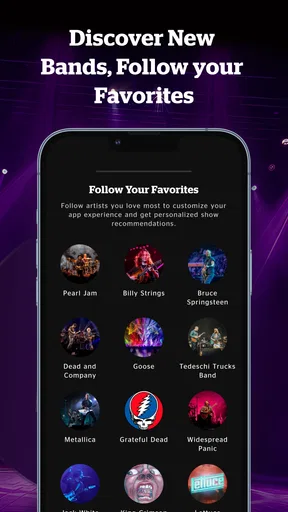
Notifications about bands can help me keep track of activity, but I’d be selective about which artists I follow. Following the musicians I genuinely care about makes those alerts more useful; following too broadly could turn a handy nudge into noise. I’d also treat a notification as a prompt to check what’s available, not a guarantee that I can watch or listen right then. The practical benefit is staying aware, while the trade-off is that attention and timing still belong to me.
Handling a slow start or interrupted playback
When a concert takes longer than expected to load, I’d first check whether other online activity on the phone is struggling too. If everything is slow, switching to a more dependable connection or waiting until I’m back on one is more sensible than repeatedly tapping the same control. If only one show is slow, I’d move away briefly and try another recording, then return to the first later. That approach helps me avoid wasting a listening session on a single stubborn item.
I’d also avoid assuming that a brief pause means the app has lost my place or that the performance itself is unavailable. Give playback a moment, check the connection, and retry calmly rather than starting over several times. These are ordinary streaming habits, but they matter more with a lengthy set: repeated restarts make it harder to settle into the music. If I’m depending on a particular stream for an occasion, I’d test playback beforehand so a loading delay doesn’t become the main event.
The larger point is that the experience is partly shaped outside the app. A phone switching between Wi-Fi and mobile reception, a crowded network, or simply being in a weak-signal spot can make the same recording feel smooth one day and uneven the next. I find it fairer to evaluate the service in a stable setting before deciding that a hiccup is typical. At the same time, anyone who needs uninterrupted audio in places with unreliable connectivity should think carefully about whether a streaming-first routine suits them.
Making sensible choices about mobile data
Long listening sessions can use more mobile data than a brief check-in, so I’d reserve them for Wi-Fi when I’m trying to keep cellular use down. A practical habit is to browse and choose a show while connected at home, then make a deliberate decision about whether to stream it on the go. That avoids opening a long concert casually and discovering later that it consumed more of my data allowance than I intended.
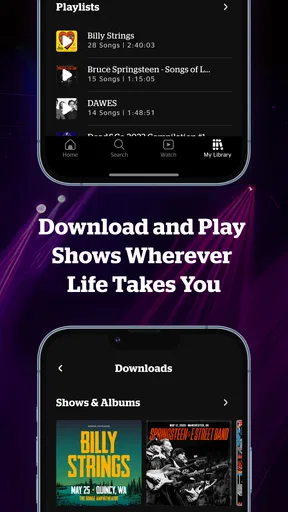
I wouldn’t treat an old reference to downloaded shows as proof that a particular offline option is currently available or works in a specific way. Instead, I’d check the controls in the version I’m using and plan around what they actually offer. If offline listening is important to your commute, verify that before relying on it; if it isn’t, keeping playback to Wi-Fi is a straightforward way to reduce uncertainty. This is the sort of detail that matters more to a frequent traveler than to someone who mainly listens at home.
Discovering New Music with nugs
First things first, let’s talk about what nugs brings to the table. This app is like a treasure chest for music lovers who crave live performances and rare recordings. It’s loaded with concerts from an array of artists, both big names and hidden gems. I was immediately drawn to its vast library, which seemed endless in its offerings.
Once I fired up the app, the interface greeted me with a clean and user-friendly design. Easy navigation is a must for me, and nugs delivers on that front. With just a few taps, I was diving into live sets from bands I’ve loved for years, as well as discovering new artists I’d never heard of before.
The Listening Experience
Now, onto the sound quality—which, let’s be real, is the bread and butter of any music app. The audio quality in nugs is top-notch. It’s like having a front-row seat at a concert without the hassle of overpriced drinks and crowded venues. I could feel the energy of the live performances, and it truly enhanced my listening experience. You can stream in high fidelity, which is perfect for the audiophiles out there.
Another cool feature is the ability to download shows for offline listening. This was a game-changer for me during my daily commute. I could groove to a live jam session without worrying about data usage or spotty service. It’s like carrying a concert in your pocket!
Features That Stand Out
One feature that really caught my eye was the curated playlists. They’re a fantastic way to explore new music without feeling overwhelmed by choice. The app’s recommendations were spot-on, introducing me to artists that quickly became new favorites.
Besides the music itself, nugs offers a unique social aspect. You can follow bands and get notifications about new releases or upcoming live streams. It’s like being part of a virtual fan club, keeping you connected to the artists you love.
That focus also explains who I think will get the most from it. If you follow live bands, enjoy hearing a full set rather than just a familiar single, or like finding a different performance by an artist you already know, the service has a clear purpose. It is less compelling if you mainly want a broad mix of chart hits, spoken audio, or an algorithm that quietly supplies background music with minimal searching. For that everyday role, a general music-streaming app may be a more natural fit.
The difference is not simply a matter of having more or fewer songs. With a conventional streaming library, I often jump between studio versions and let a playlist decide what comes next. Here, the attraction is the character of a particular performance: the pacing, the atmosphere, and the sense of hearing a band in a specific moment. I’d choose between the two based on whether I want convenience and variety or a deeper concert-focused listen. Neither approach replaces the other for me.
One useful way to explore without getting lost is to use a known favorite as an anchor. I’d pick a band I already enjoy, listen to a set, and then follow a recommendation or playlist from there. That gives discovery some direction instead of asking me to browse an enormous catalog without a starting point. If I find a performance I want to revisit, I’d note the artist or show so I can return deliberately rather than hoping it appears again in a feed.
There is a trade-off in the very thing that makes live recordings special: different versions of a song may be less immediately familiar than the studio track. That can be rewarding when I want variation, but not ideal when I’m looking for a precise, predictable soundtrack while concentrating. I’d reach for a familiar playlist during focused work and save a concert for a walk, a relaxed evening, or another moment when I can enjoy the changes in a performance.
Where nugs Could Improve
While I’ve been singing praises, there’s always room for improvement. One thing I noticed was that the app occasionally took a bit longer to load some of the larger concert files. It’s not a deal-breaker, but a faster loading time would definitely elevate the experience.
Additionally, while the library is impressively vast, there were a few artists I hoped to find but didn’t. Expanding the artist catalog would make this app unbeatable in the live music realm.
That catalog limitation is worth considering before making it your only music app. I would search for the artists I most want to hear, not just assume that a large collection will include every favorite. If the catalog matches your listening habits, depth around live performances can matter more than covering every artist you occasionally play. If your taste is broad and changes constantly, a general service may give you fewer dead ends.
Cost is another practical part of the decision. The app is free to install, while in-app purchases range from $2.99 to $279.99 per item. I’d look carefully at what a particular purchase covers before committing, and compare that choice with how often I expect to use the service. Someone who only wants to sample the idea may prefer to explore what is available at no cost first; a dedicated concert listener may judge a purchase differently because a favorite performance has more personal value.
For context, nugs is a music-and-audio app from nugs.net, released on November 9, 2015. It has an average rating of 4.6 from around 7,000 ratings, and has been installed over 500,000 times. The age rating is Everyone. Those figures suggest an established audience, but I’d still make the choice based on the artists I care about and the way I listen, not popularity alone.
Before settling into a long session, I’d also make a small routine of checking the connection and choosing a suitable moment. That is more useful than expecting every listening situation to work equally well. If I’m on a stable home network, a full concert feels like an easy choice; if I’m rushing between errands with limited data and patchy reception, the app’s main appeal is harder to enjoy. This distinction gives a clearer answer than a simple yes or no about whether it belongs on a phone.
Final Thoughts
All in all, nugs is a must-have for any music enthusiast who loves live performances. It’s more than just an app; it’s a gateway to a world of music that feels personal and immersive. Whether you’re a casual listener or a hardcore fan, this app is sure to keep your playlists fresh and exciting.
So, if you’re ready to break free from the usual music apps and dive into something truly unique, give nugs a try. Trust me, your ears will thank you!
My final connectivity verdict is positive with a clear condition: I’d recommend it most to listeners who can choose when and where they stream, and who are happy to spend time with live sets rather than demand instant, uninterrupted background playback everywhere. I’d skip it as a primary option if my routine depends on weak-signal commutes, strict mobile-data limits, or a catalog that must cover every artist I play. For the right listener, the live-performance focus is distinctive; the best experience comes from matching it to a reliable connection and a moment when a concert can hold my attention.
Pros
- Intuitive interface for easy navigation.
- Excellent quality across all streams.
- Exclusive live concert access.
- Diverse range of music genres.
- Regularly updated content library.
Cons
- Limited offline download options.
- Requires a subscription for full access.
- No integration with other music apps.
- High data usage during streaming.
- Some playlists lack customization.
FAQs for nugs
What is nugs.net and how does it work?
nugs.net is a music streaming app that focuses on live concert recordings. It offers a vast library of live performances from popular artists across various genres. Users can stream audio and video content, create playlists, and even download shows for offline listening. The app provides a unique experience for fans of live music.
Is there a free version of nugs.net available?
nugs.net offers a free trial period for new users to explore the app's features. However, to access the full library of live concerts and exclusive content, a subscription is required. The app offers different plans, including monthly and annual subscriptions, to cater to different user needs.
Can I download live concerts for offline listening on nugs.net?
Yes, nugs.net allows subscribers to download concerts for offline listening. This feature is particularly useful for users who want to enjoy their favorite live shows without relying on an internet connection. Offline downloads are available for both audio and video content, making it convenient to enjoy music on the go.
What devices are compatible with nugs.net?
nugs.net is compatible with a variety of devices, including smartphones, tablets, and desktop computers. The app is available for download on both Android and iOS platforms, ensuring a wide range of users can access its extensive library of live music. Additionally, users can stream via web browsers on their desktops.
Does nugs.net offer any exclusive content?
Yes, nugs.net provides exclusive content that can't be found on other platforms. Subscribers can access unique live recordings, rare performances, and special releases from their favorite artists. This exclusive content is a major draw for music enthusiasts who want to experience concerts in a unique and personal way.


